Google Apps Business and Education customers got a security option today. Administrators can now delegate certain admin privileges, such as creating new accounts or managing mail lists, to specific users without making them a full fledged administrator. That means IT can offload certain responsibilities to HR staff or managers, or create permissions for IT workers with fewer permissions than senior IT staff.

This is another step forward for Google Apps, which is still making the case for itself in the enterprise. And even in smaller organizations, being able to delegate admin roles to various user can helpful.
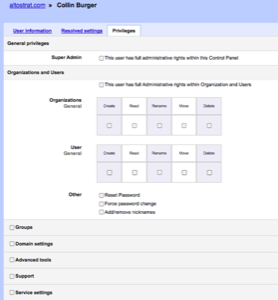
According to the Google Enterprise Blog, here’s how to enable the new feature:
- Log in to the Google Apps administrator control panel
- Under “Organization and Users,” find and click on the user account to which you wish to grant privileges
- Click the “Privileges” tab
- To make the user a Super Admin select the check box labeled “This user has full administrative rights within this Control Panel.” To restrict the user’s access to selected functions the Control Panel, select the check boxes next to the tabs you want the user to access
- Select the specific actions the user is allowed to perform under each tab
- Click “Save changes” and “OK” to confirm that you want to grant administrator access to the user