Google just announced a small but useful update to the chat feature in iGoogle and Orkut, Google’s social network. You can now use the chat feature to send photos, documents and other files directly to your contacts. More importantly, though, Google also announced that it plans to finally bring this file transfer functionality to Gmail’s built-in chat feature. Right now, if you want to transfer a file to your Google contacts, you either have to email them the file or use the Google Talk desktop app or a compatible instant messaging client.

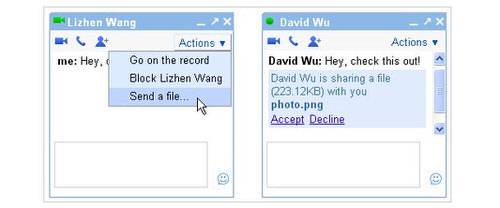
To use this feature, simply go to your chat widget in iGoogle or Orkut, start a chat and click on “Send a file…” in the “Actions” menu. The recipient will be able to either accept the incoming file or politely decline the transfer.
Chat in Gmail already features video and voice chat, but the file transfer feature is currently still missing. It always seemed rather strange to us that some of Google’s instant messaging services like the Google Talk desktop client already had this capability. Now, there isn’t even feature parity among the web-based version of Google Talk anymore. Hopefully Google will soon fulfill its promise and bring this feature to Gmail as well.