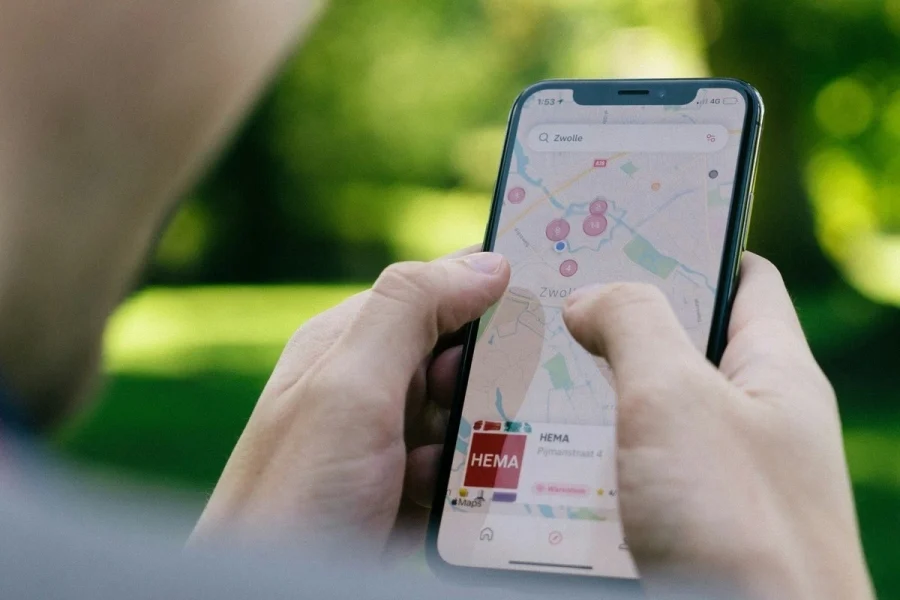
Learning how to track someone’s location on Google Maps is all about peace of mind. Whether you’re a worried parent, an employer keeping tabs on company-owned devices, or someone suspecting infidelity, knowing their location at all times gives you the clarity you need. In a study by ExpressVPN, nearly half the participants — 49% to be exact — admitted to using location-sharing tools to track their partners.
With real-time location sharing, Google Maps can show where someone is at any moment, how long they’ve been there, and even their travel history. On that note, here’s how to track someone’s location on Google Maps.
- Show Full Guide
How To Track Someone's Location on Google Maps - Step By Step
Tracking someone’s location on Google Maps is pretty straightforward. Here’s a step-by-step guide on how to set it up.
Open Google Maps App
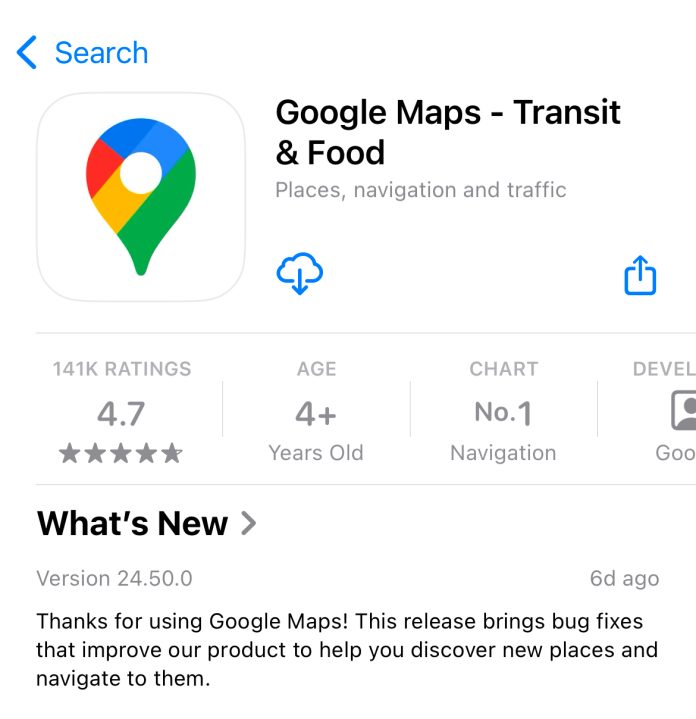
Open the Google Maps app on the phone you want to track. If the app isn’t installed, download it from the App Store on iOS or Google Play on Android.
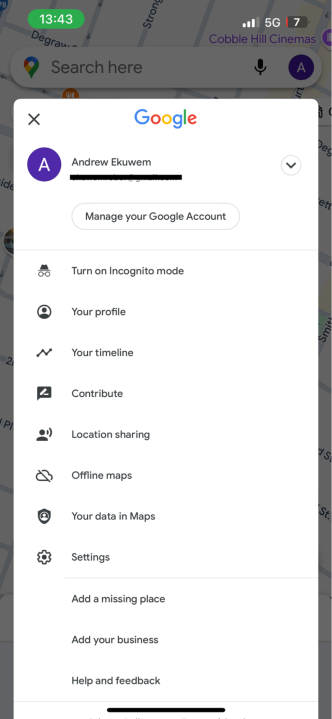
Open the Menu
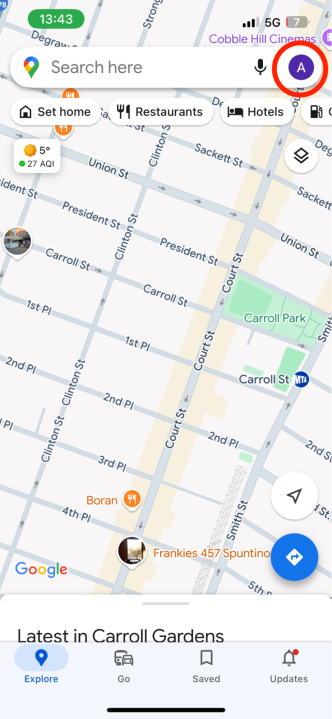
Tap on the profile icon or avatar in the top-right corner of the screen.

Access Location Sharing
From the menu, select “Location Sharing” to access the sharing options.
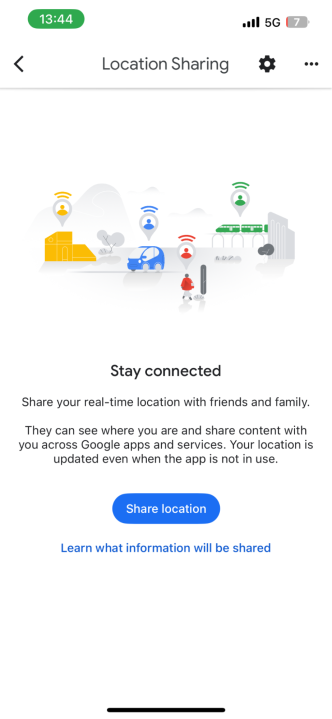
Set Up Location Sharing
Choose “Share Location” and decide how long you want to share the location. You can opt for a set time period (like 1 hour) or enable “Until you turn this off” for indefinite sharing.
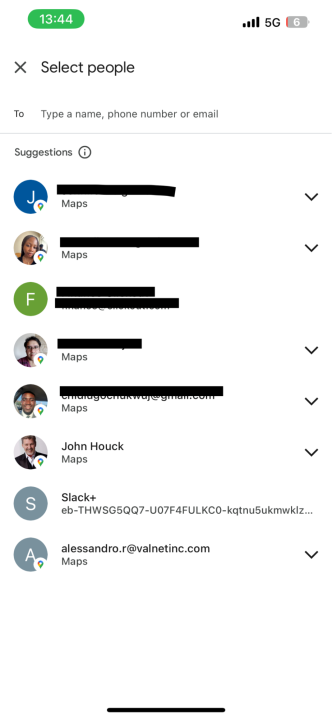
Add a Contact to Share With
Select the person you want to share your location with from your contacts or by entering their email address. The recipient must have a Google account to view your location.
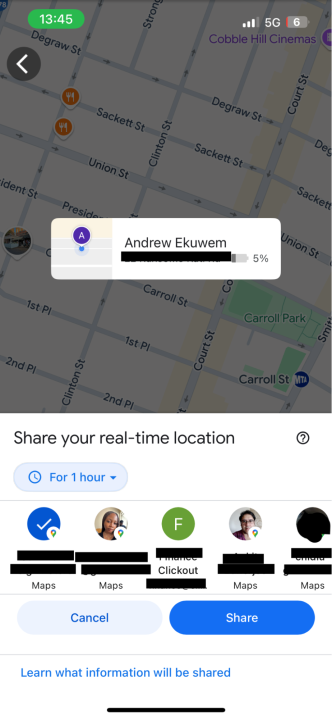
Send the Location Sharing Link
Once you’ve chosen the recipient, tap “Send” to share the link. They will receive a notification or email with a link to view your location in real time on Google Maps.
Why Might You Need To Track Someone’s Location With Google Maps?
From ensuring your kids are safe to finding out if your partner is cheating on you, there are so many reasons why you might need to track someone’s location with Google Maps. Here are some specific cases:
- Parental Control – Keeping your kids safe is a challenge for any parent. With Google Maps, you can monitor your child’s location in real-time, so you always know where they are, even when they’re out of sight. You’ll know when they’ve arrived at school, or you can just check to see if they’re where they said they’d be. Many parents also use it to track their teens who have just started driving to ensure they stick to safer routes.
- Tracking a Stolen Phone – A stolen or lost phone can quickly become a nightmare. Google Maps can help you locate your device before it’s gone for good with location sharing. If enabled before it goes missing, you can track your phone’s exact location as long as the device is powered on. This way, you can recover devices left behind in restaurants, public transport, or even stolen outright.
- Safety of Friends & Family While Traveling – When friends or family travel, their safety is often a top concern for their loved ones. Google Maps has real-time tracking that updates you on their progress so you know they’re safe. This helps you stay on top of their planned route so you’ll be informed of any unexpected delays or detours. This feature is especially useful during long road trips, hikes, or when traveling in unfamiliar cities. Sharing locations also makes it easier to meet up in crowded areas where a phone call and instructions aren’t enough to find your friend.
- Tracking Employees Using Company Devices – For business owners, tracking employees who use company devices is a thing of efficiency and accountability. With Google Maps, you can see if your employees are where they need to be during work hours. This can be a priceless tool if you manage a delivery service or field technicians. It can help prevent unauthorized use of company vehicles, ensure deliveries happen on time, and verify routes taken. It also provides a layer of protection for employees, as their locations can be used to confirm safety in the field or assist them in emergencies.
- Tracking a Spouse – You might also find yourself worried about your spouse’s safety, or you suspect they may be cheating. When this happens, Google Maps can offer the answers you need. If your partner shares their location with you, you can check in during late-night commutes, long trips, or emergencies to ensure they’re safe. On the other hand, if you doubt they’re being faithful, you can find out in real time or check their location history to confirm whether they’re where they said they’d be.
How To Request a Friend or Family Member’s Location
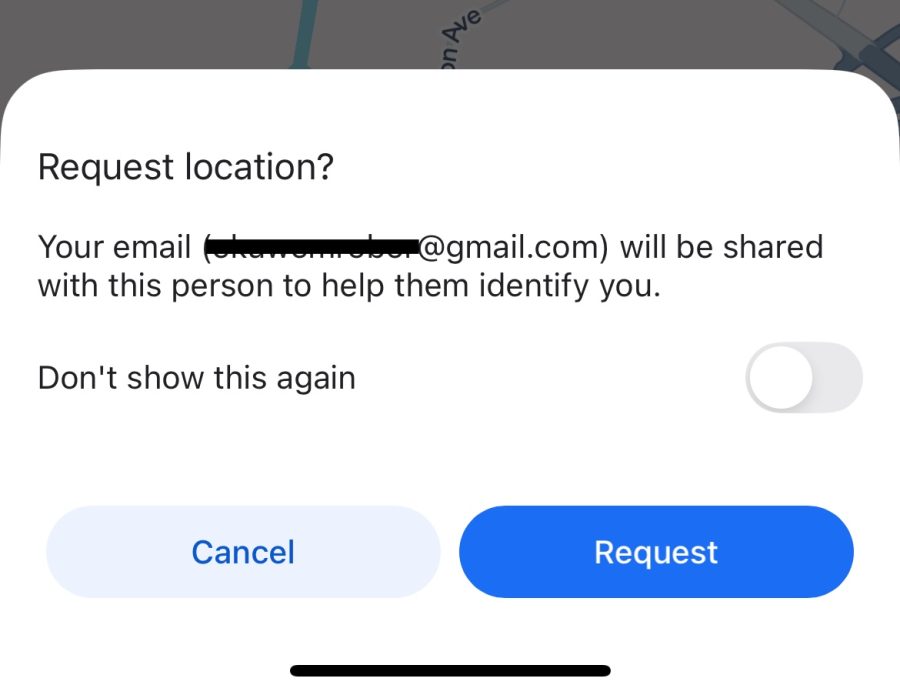
The easiest way to request someone’s location on Google Maps is by sending a Location Sharing invite. Here’s how to do it with just a few steps.
- Open ‘Google Maps’ on your device.
- Tap your profile icon in the top-right corner, then select ‘Location Sharing’ from the menu.
- In the ‘Location Sharing’ screen, tap ‘Request’ to send a request to the person whose location you’d like to track. The recipient will receive a notification or email with your message and the option to accept or decline.
How To Stop Tracking Someone On Google Maps
If you no longer need to track family members on Google Maps, you can stop location sharing at any time. Here’s how;
- Open ‘Google Maps’ on your device.
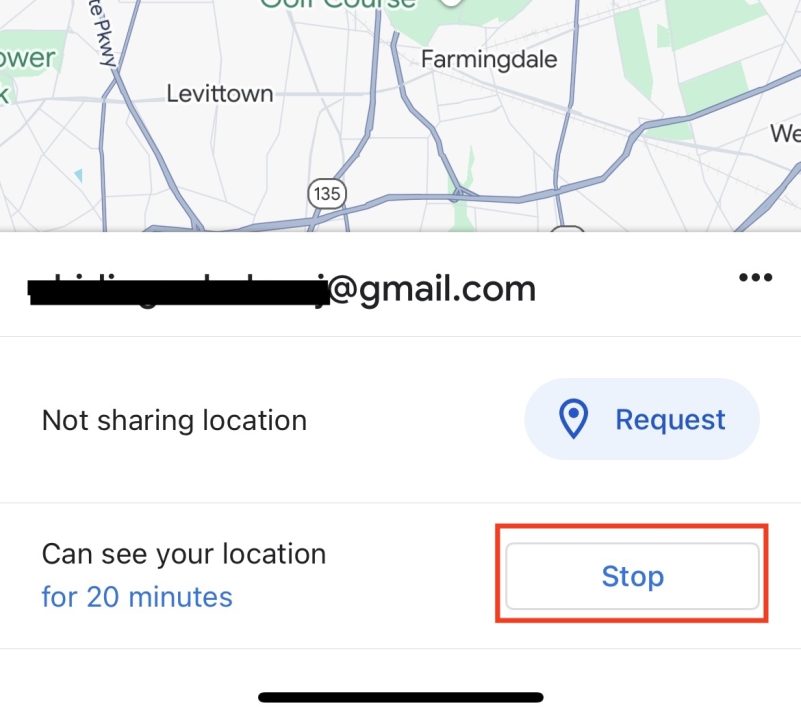
- Tap your profile icon in the top-right corner, then select ‘Location Sharing’ from the menu. This will show the list of people sharing their locations with you.
- Find the person’s name or contact information in the list of shared locations. Their profile should include their current location details,
- Tap their name and select ‘Stop.’
6 Other Methods To Track Someone’s Location Easily
Google Maps is a popular option for tracking your family member’s location, but it’s not the only tool available. To track a phone’s location, you may try out other tools or apps with more features, greater precision, or even stealth capabilities. With that said, let’s look at some alternative ways to track someone’s location effectively.
1. Using a Spy App with GPS Tracking
The best spy apps are powerful tools for tracking someone’s location, often offering advanced features beyond basic GPS tracking. These apps can monitor location history, live GPS positions, and activities like messages and call logs. Examples include FlexiSpy and uMobix, but mSpy is my top choice. mSpy is easy to install and provides real-time location tracking and geofencing, so you’ll be notified when the device you’re tracking enters an area you’ve mapped out.
This makes it especially useful for parents monitoring their children or for employers to ensure company-owned devices are used appropriately. It also works in the background without notifying the user.
2. Tracking Via WhatsApp
This method can work well if you want a lightweight and user-friendly option. WhatsApp has a built-in location-sharing feature that makes it easy to track someone’s location in real time. Although the person must manually share their location with you, it’s simple to use and widely accessible. To use this feature, select the Location option after clicking the + icon in a WhatsApp chat window. The subject can share their live location for a specific period – 15 minutes, 1 hour, or 8 hours. Once shared, you can track their live location on a dynamic map within the app.
Social media platforms like Facebook, Instagram, and Snapchat can unintentionally reveal someone’s location. Many users share check-ins, stories, or photos with geotags or location data. For instance, Facebook has a “Check-In” feature that users often enable when visiting restaurants, events, or other landmarks.
Snapchat’s Snap Map can display a user’s exact location if they’ve turned on location sharing. Similarly, Instagram stories or posts with location tags can provide clues about where someone is or has been. Using social media to track someone’s location is not foolproof, as users can limit who sees their location or share outdated posts.
4. Using a Physical GPS Tracking Device
A physical GPS tracking device provides accurate and reliable location tracking, especially for vehicles, luggage, or other assets. These devices often have real-time tracking, geofencing alerts, and a battery life that lasts for weeks. Parents commonly use them to track teen drivers, employers to monitor fleet vehicles, or individuals to secure valuable belongings. Unlike apps, GPS trackers don’t rely on a phone’s battery or internet connection, making them more reliable in remote areas.
They also offer added features like historical route data and emergency alerts. However, they do require upfront investment and, at times, monthly subscription fees for advanced tracking features.
5. Via Their Mobile Carrier
Mobile carriers offer location services that let you track someone’s phone. These services use cell towers to pinpoint a device’s location, which can be accessed through dedicated apps like AT&T’s Secure Family, Verizon’s Smart Family, or T-Mobile’s FamilyWhere.
Carrier-based tracking is ideal as it’s built into the phone plan and doesn’t require third-party apps. These services often allow you to set up alerts, monitor location history, and track real-time movements. While carrier tracking is convenient, it requires the account holder’s consent. It’s also less precise than GPS-based tools but provides a solid backup option when GPS isn’t available.
6. Using the Google Earth App
Google Earth isn’t a traditional tracking tool, but it can help analyze location data creatively. With its high-resolution satellite imagery and 3D maps, you can explore places someone has visited or plans to visit. By integrating with GPS data or location history, Google Earth can provide visual insights into someone’s movements. For instance, if you can access their location history from Google Maps or a GPS device, you can overlay it on Google Earth for a clearer view of routes and landmarks. It’s free to use and adds a layer of visual detail.
Best Google Maps Alternatives for Tracking Someone’s Location
Looking for reliable Google Maps alternatives to track someone’s location? Here’s a quick comparison of the top tracking providers to help you choose the best option.
| Provider | Starting Price | No. Of Devices | Free Version | Guarantee | Compatibility |
|---|---|---|---|---|---|
| mSpy | $11.66 | Up to 3 | Yes | 14 days | iOS, Android |
| Spynger | $9.28 | 1 | No | 30 days | iOS, Android |
| uMobix | $12.49 | 1 | Yes | 14 days | iOS, Android |
| Scannero | $49.80 | Unlimited | Yes | 14 days | iOS, Android |
| Spybubble Pro | $12.49 | 1 | Yes | 30 days | iOS, Android |
| Eyezy | $7.99 | 1 | Yes | 14 days | iOS, Android |
| Phonsee | $8.85 | 1 | Yes | 14 days | iOS, Android |
| ClevGuard | $4.99 | Up to 20 | Yes | 30 days | iOS, Android |
Conclusion
Google Maps is a fantastic tool for tracking someone’s location, especially when you need a quick and free solution. It’s easy to use, reliable, and widely available on almost all devices. However, Google Maps wasn’t designed for detailed location tracking or advanced monitoring. It lacks options like viewing location history in depth, setting geofences, or receiving alerts when someone enters or leaves a specific area. Also, it relies on the user actively sharing their location, which isn’t ideal for more secure or discreet tracking needs.
That’s where paid location tracking apps step in, offering advanced features that Google Maps simply can’t match. Among the paid options, mSpy stands out as my top recommendation. It offers a user-friendly interface, advanced GPS tracking, and extra features like app monitoring and browsing history access.