Breezy, a mobile printing startup, recently launched a version of its app for the iPhone.

Once installed, the app lets you print documents and other files from your iOS device, whether to a printer at your home, office or a public location. The application comes equipped with a feature that uses GPS to find nearby public printers, many of whom have partnered with Breezy.
Once the app is installed, documents can be printed directly from it or from iPhone Mail, if the document came as an attachment. Tapping the filename in the email will reveal a new option: “Open in Breezy.”
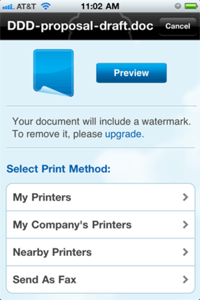
From there, you can either send the document to your own printer (after installing the Breezy Connector software) or to a nearby public printer, who is likely to charge for the print job. This feature is only available to premium subscribers.
Breezy is not the first iPhone printing solution. There are a number of other third party apps that attempt to supply this badly-needed function. Apple launched its own mobile printing solution for iOS 4 called AirPrint, which only works with a list of compatible printers.
The breezy app is free, but if you want to print documents without the company’s watermark, you’ll have to pay up for premium subscription. Doing so will also buy you unfettered access to partner printers. The app can also send faxes, which require Breezy Credits.