With the launch of the Samsung Z2- the first ever 4G enabled Tizen based smartphone, Samsung also introduced the new Tizen 2.4.0.4 firmware version which brings in some neat little changes into the Tizen mobile space. The ‘Dual Profile app’ is one such feature that has made its way on to Tizen. Until now, we have seen this feature being baked into a lot of Chinese custom Android roms like MiUI, CoolUI, etc. This feature enables users to maintain two Whatsapp accounts on the same phone (which in this case is the Z2).
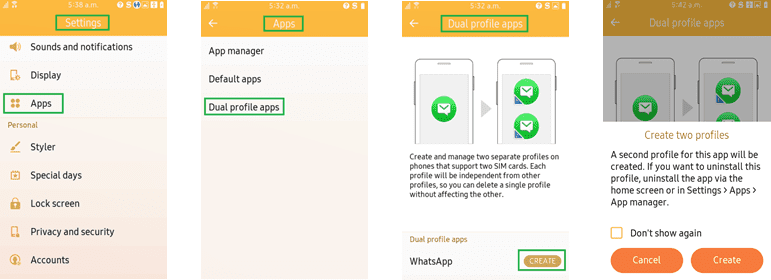
You will have to follow a few simple steps to get this feature enabled on your Z2.
- Go to Settings>Apps>Dual profile apps and tap on create.
- Go back to home and you’ll see two Whatsapp icons with numbers 1 and 2 on them.
- Now open each whatsapp icon, provide your contact number and get your Whatsapp activated
Video
https://www.youtube.com/watch?v=m2tmakTUTK0